01Install
- Download
Umbra-Setup.exe. - Run it. If Windows SmartScreen says it "protected your PC", choose More info → Run anyway. The installer isn't code-signed yet.
- Follow the wizard. You can tick Start Umbra when I sign in to Windows and add a desktop shortcut.
- Umbra appears as a crescent in the system tray. Click the ^ arrow near the clock if you don't see it.
Needs: Windows 10 or 11 and a webcam. Setup installs just for you by default, so no administrator rights are needed. Prefer no installer? Get the portable zip, extract it anywhere and run Umbra.exe.
02Calibrate
The calibration wizard opens the first time you start Umbra. It takes about a minute and makes detection fit you, your chair and wherever your camera sits.
- Centre and edges: look at the amber dot in the centre, then at the arrows on the left, right, top and bottom edges of your screen. Press Space to record each one.
- Look away: turn your head left, right, up and down, as you would when you're not using the screen. A beep marks the start and end of each recording, so you know when to look back.
- Eyes only: keep your head still and glance to the side, past the screen.
- Check your personal limits on the summary screen and click Save.
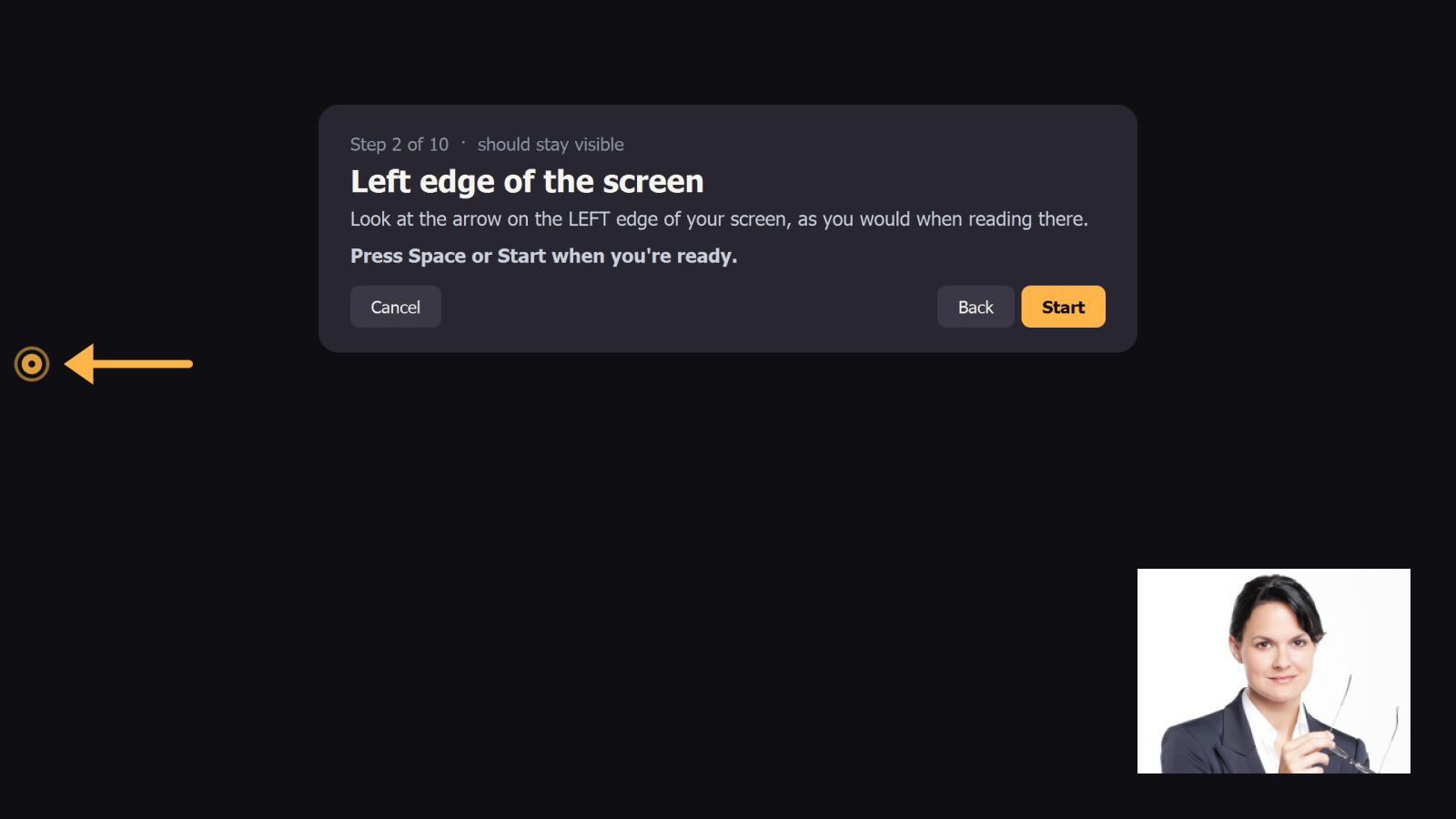
Rerun it any time from the tray menu (Calibrate…). If you only moved your chair, Camera preview → Re-centre is quicker.
03Everyday use
- Work as normal. When you look away, the screen is covered. Look back and it's revealed.
- Press F8 from any app to turn protection on or off.
- Need a break? Right-click the tray icon → Pause for → 5, 15, 30 or 60 minutes.
- Change what covers your screen: tray → When I look away → Blur, Custom image, GIF / video or Solid colour.
04The tray icon
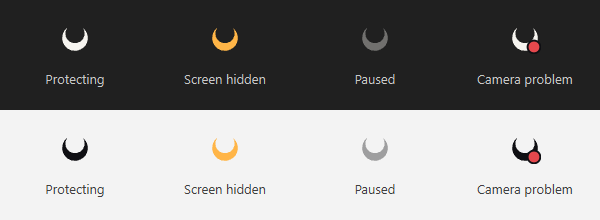
| Icon | Meaning |
|---|---|
| Crescent | Protecting: you're looking at the screen. |
| Amber crescent | Your screen is hidden right now. |
| Faded crescent | Paused or turned off. |
| Red dot | Camera problem. Hover for details. Your screen stays visible. |
Right-click for the menu, or double-click to open Settings. The icon switches between light and dark to match your taskbar.
05Settings
Open from the tray: Settings…
| Setting | What it does |
|---|---|
| Protect my screen | Master on/off switch. |
| Start with Windows | Launch Umbra quietly when you sign in. |
| Hotkey | Click the box and press any key combination. Default F8. |
| Camera | 0 is your default webcam; try 1, 2… for external cameras. |
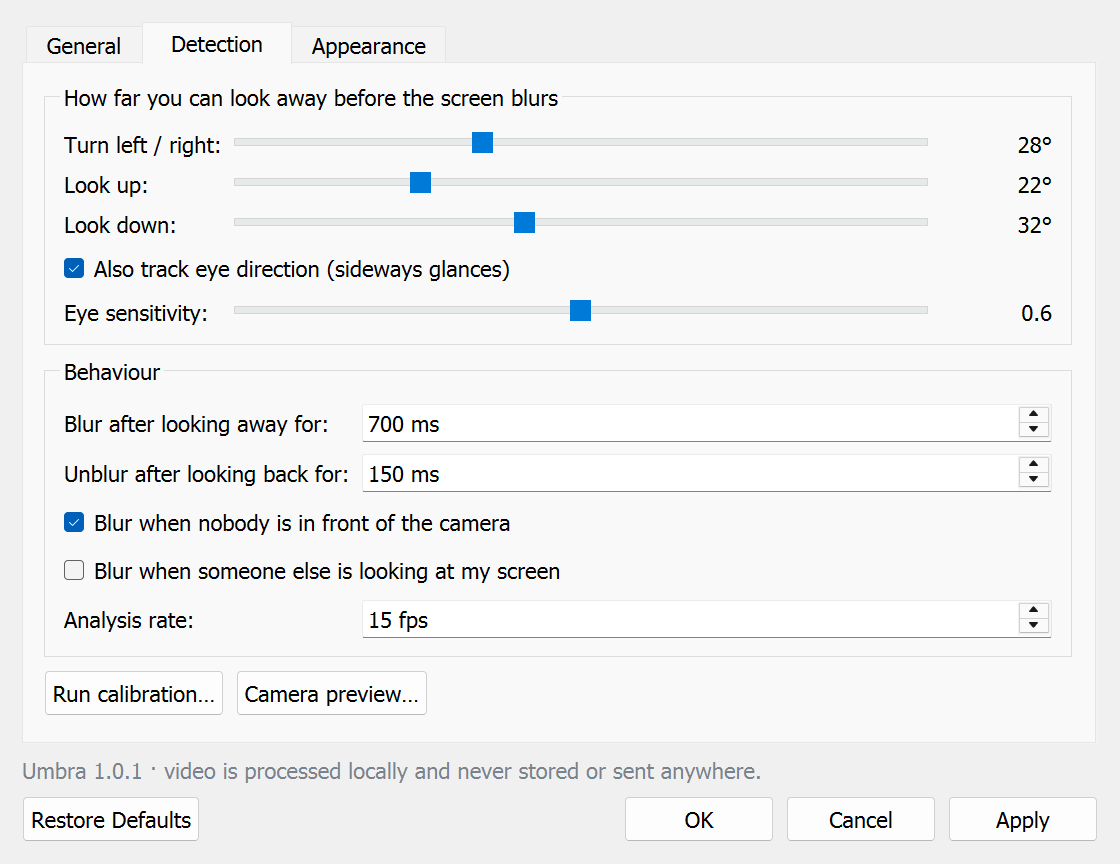
| Turn / up / down | How far you can turn before the screen hides. Calibration sets these for you. |
| Eye tracking | Also react to sideways glances while your head stays still. |
| Blur after | How long you must look away first (default 700 ms). |
| Unblur after | How quickly it comes back (default 150 ms). |
| Nobody in front | Hide the screen when you leave your desk. |
| Someone else looking | Hide when a second person faces the screen. |
| Cover style | Blur, custom image, GIF / video, or solid colour, plus blur strength, darkening and an optional message. |
| Test overlay | Shows your cover for 3 seconds so you can check it. |
06Troubleshooting
The screen hides while I'm still reading it
Run Calibrate… again and look at the real edges of your screen during the edge steps. You can also raise the angles or the Blur after delay in Settings → Detection. If it happens when you glance at the keyboard, raise Look down.
It doesn't hide when I look away
Open Camera preview… and turn your head: the readout shows FOCUSED or AWAY and why. Lower the angles, or rerun calibration and turn further during the look-away steps.
"Camera is unavailable"
Another app (Teams, Zoom, the Camera app) may be using the webcam, or camera access may be off in Windows Settings → Privacy & security → Camera. For an external webcam, try camera 1 or 2 in Settings → General. Umbra retries every few seconds.
The hotkey doesn't work
Another program may already use that key. Umbra tells you when it can't register one. Pick a different combination in Settings → General.
Detection is poor in the dark
The face tracker needs to see your face. Put some light in front of you rather than behind you.
Does it cover games or full-screen video?
Ordinary windows and borderless-windowed apps, yes. Exclusive-fullscreen games draw above everything and can't be covered.
07Privacy
Umbra processes each camera frame in memory to measure head and eye direction, then throws it away. It never records, saves or uploads video or images, and it makes no network connections (the face model ships with the app). When protection is off, the camera is released.
Settings are stored in %APPDATA%\Umbra\settings.json. The code is open source: github.com/SihabSahariar/Umbra.
08Uninstall
Go to Windows Settings → Apps → Installed apps → Umbra → Uninstall. Umbra is closed, its start-up entry removed, and you're asked whether to keep your settings.